Self Employed Quarterly Tax Organizer, Google Sheets, Excel and PDF
A quarterly tax spreadsheet for self employed and 1099 workers. Income and expenses split into four periods you define, a set aside figure worked out from a percentage you enter, and a column for what you have actually put by.
Refund policy
Refunds within 30 days, for any reason. Reply to your receipt and the payment goes back in full. You keep the files; there is nothing to return.
What it looks like
What it does
What you get
Three files. A spreadsheet with five sheets, a printable organizer, and a guide.
- Start Here - The instructions, the color key, the Google Sheets import steps and the license.
- Setup - Your business name, the year, the percentage you set aside, the four period start and end dates, and the four payment dates. Everything else follows from what you put here.
- Income - 300 rows. One per payment received.
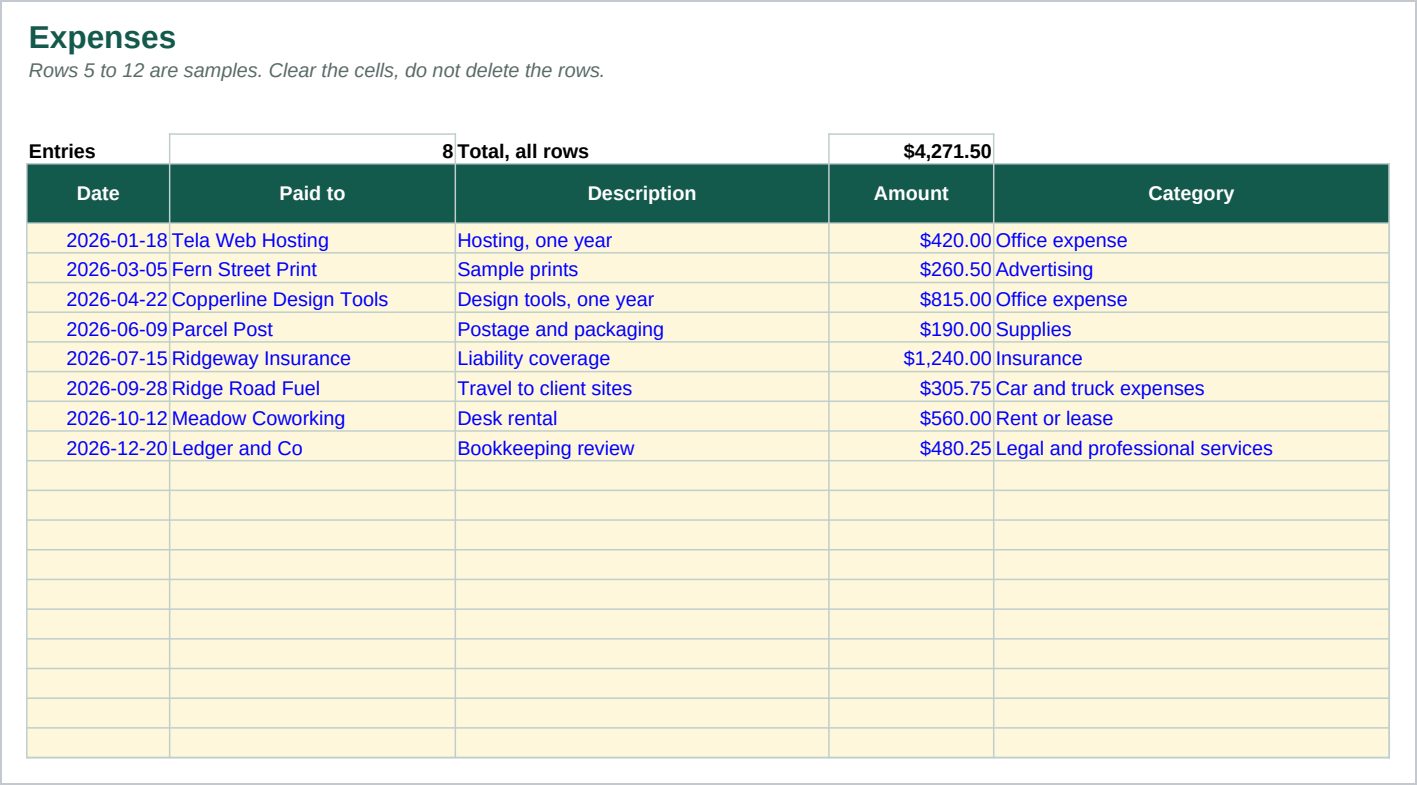
- Expenses - 300 rows. One per payment made, each with a category picked from an editable list on Setup.
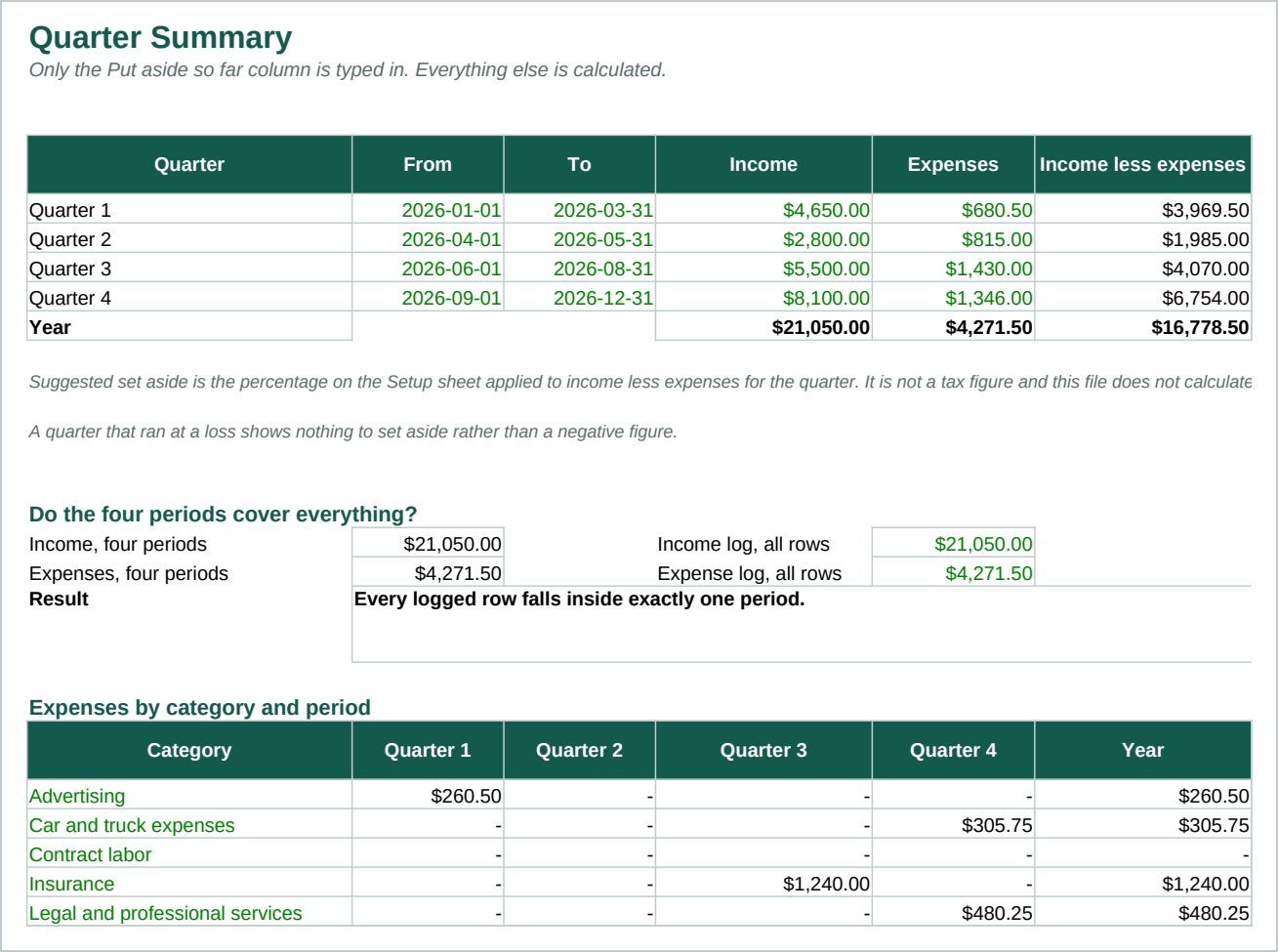
- Quarter Summary - The four periods side by side: income, expenses, the net, the suggested set aside, what you have put by so far, what is still to go, the payment date, and whether the period is Covered or Short. Below that, a check that the four periods cover every logged row, and a breakdown of expenses by category and period. One column on that sheet is typed in. Everything else is calculated.
- quarterly-organizer.pdf - A two page printable organizer, one box per period, with a short checklist and blank lines to fill in by hand.
The period start and end dates are yours to set, because the periods behind the usual four payment dates are not calendar quarters and are not the same for everyone. A period that ran at a loss shows nothing to set aside rather than a negative figure, which stops a bad period quietly pulling down the year total. The formulas use only functions that behave the same way in Excel 2016 and later and in Google Sheets.
Who it is for
A self employed person, freelancer or 1099 contractor who pays quarterly and keeps losing track of whether the money is actually there when the date arrives. It fits someone who already knows the percentage they set aside and the periods and dates they work to, or who can ask their accountant for them.
If you do not yet know what percentage to set aside, this file will not tell you, and you should ask your accountant before buying it.
What it is not
This is not accounting software. It does not connect to a bank or a card, it pulls in nothing by itself, and it reconciles nothing. You type your entries in.
It calculates no tax. It prepares no return. It gives no tax advice. It adds up what you type, splits it into four quarters, and multiplies the net by a percentage you entered. It does not know your rate, it does not know what counts as an expense, it does not know what your periods are, and it does not know when a payment is due. The percentage, the four period start and end dates and the four payment dates are all cells you fill in, and they ship with sample values that are samples, not recommendations. Confirm every one of them with your own accountant.
It does not hold your money. The set aside account is a real account at your own bank that you open and move money into yourself. This file records that you did.
It is three files: a spreadsheet, a PDF and a guide. Nothing runs, nothing updates by itself, and nothing is hosted anywhere.
Refunds
Refunds within 30 days, for any reason. Reply to your receipt and the payment goes back in full. You keep the files; there is nothing to return.