Insurance Claim and Accounts Receivable Tracker for Clinics, Excel
Seven connected sheets that track every claim from submission to payment, and then show what is outstanding, how old it is, which payer is slow, and why claims are being denied.
Refund policy
Refunds within 30 days, for any reason. Reply to your receipt and the payment goes back in full. You keep the files; there is nothing to return.
$25
Request to buyThis is not a checkout. It opens an email to the shop, which replies with a payment link. No mail app? Write to hello@wedgepress.com.
What it looks like
What it does
What you get
One Excel workbook with seven sheets:
- Start Here - How to use it in seven steps, inside the workbook.
- Settings - Practice name, the as at date every aging figure is measured from, and the threshold at which an over 90 balance is flagged.
- Payers - The insurers you bill.
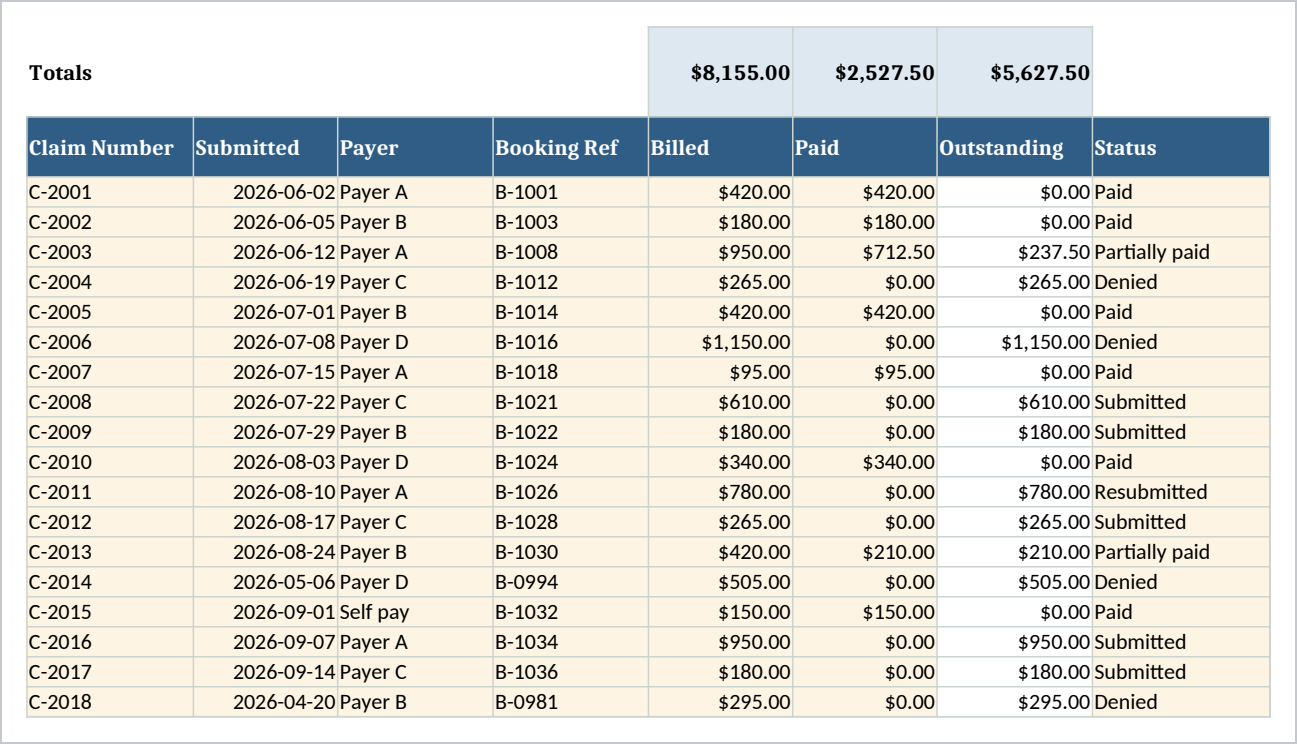
- Claims - One row per claim: claim number, submitted date, payer, your booking reference, amount billed, amount paid, status and denial reason. Outstanding, days outstanding, aging bucket and days to pay all work themselves out.
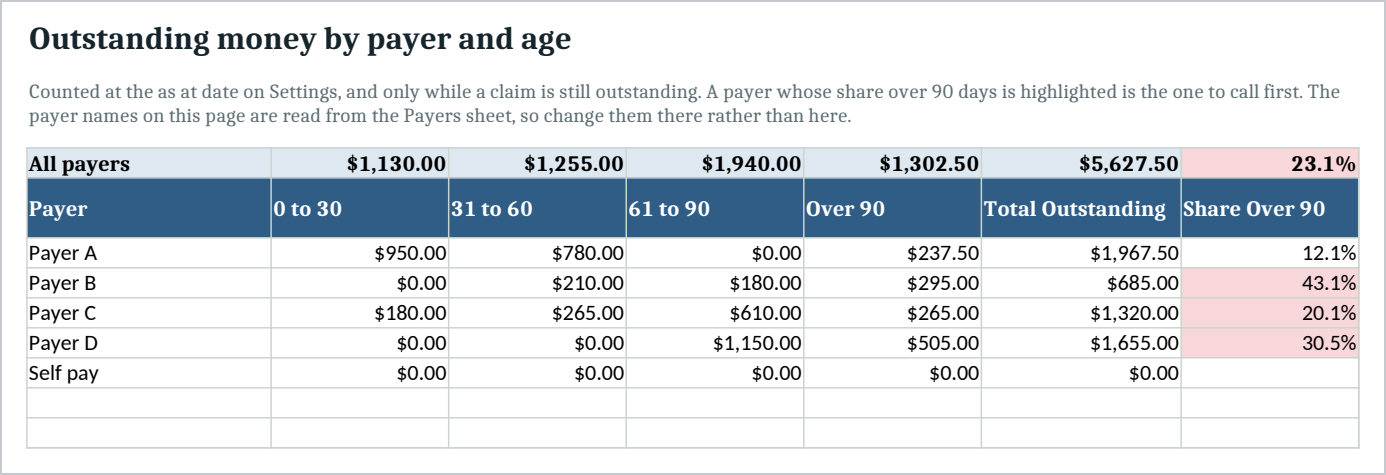
- Aging - Outstanding money by payer across 0 to 30, 31 to 60, 61 to 90 and over 90 days, with each payer's share over 90 flagged when it passes your threshold.
- Denials - Every denial reason counted, with the amount billed against each.
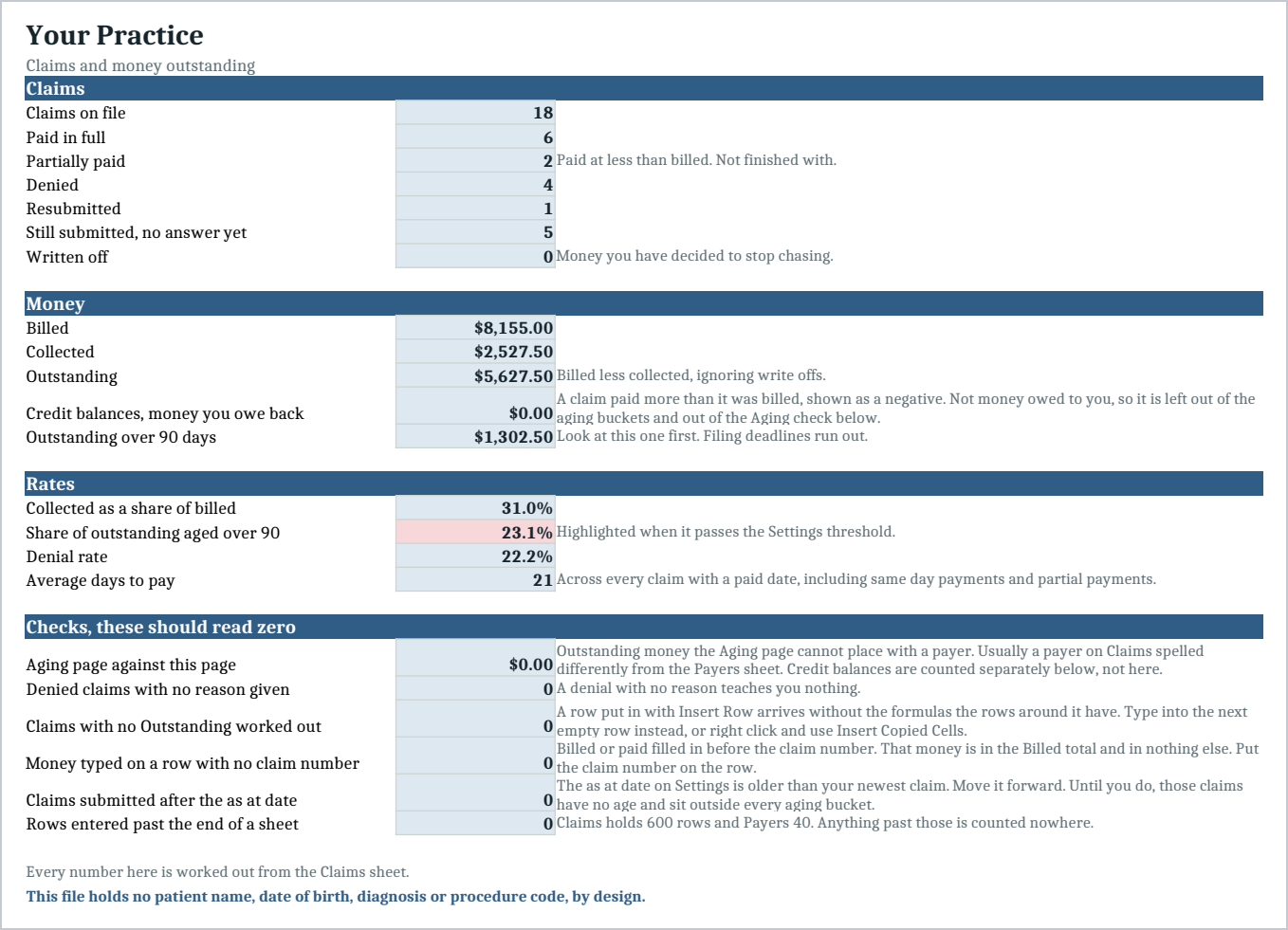
- Summary - Claims by status, money billed against collected against outstanding, four rates, and six checks that should read zero.
Six statuses, kept apart on purpose. Submitted, Paid, Partially paid, Denied, Resubmitted, Written off. Partially paid is its own status because a claim paid at less than billed is not one you have finished with, and it is not a denial either. Folding it into Paid is how underpayment goes unnoticed for a year.
Every total is a formula. The file arrives with a sample of eighteen claims across five payers, including an over 90 balance and a timely filing denial, so you can see it working before you put your own numbers in.
It holds no patient information, by design
There is no column for a patient name, a date of birth, a diagnosis, a procedure code, an insurance member number or a phone number. There is nowhere to type one.
The identifiers are a claim number and your own booking reference. Both are your numbers, not a person's. A diagnosis or a procedure code would make this a record about somebody's health. A claim number does not.
Billing spreadsheets are where identifying information usually creeps in, because it feels useful at the time. Everything here works without it.
Who it is for
The practice manager or biller at a clinic with one to about ten providers: dental, chiropractic, physical therapy, veterinary, counseling or a small medical practice. It suits a practice that bills insurers and has no reporting on what is outstanding beyond a memory and a pile of remittances.
What it is not
It is not billing software and it does not submit anything. It does not connect to a clearing house, it does not check eligibility, it does not post remittances, and it holds no clinical record of any kind.
It makes no claim about any law or standard. What it does is described above: it tracks claim numbers and amounts you type in, and it contains no patient information.
You need Excel, or Google Sheets, to open it. Import instructions are in the guide.
Refunds
Refunds within 30 days, for any reason. Reply to your receipt and the payment goes back in full. You keep the files; there is nothing to return.