Client Renewal and Contract End Date Tracker for Agencies, Excel
Seven connected sheets that hold every client contract, work out when each one has to be decided, and then show what is coming up, what it is worth and whose it is.
Refund policy
Refunds within 30 days, for any reason. Reply to your receipt and the payment goes back in full. You keep the files; there is nothing to return.
What it looks like
What it does
The date that matters is not the end date
A retainer ending on 15 March with sixty days' notice has to be acted on by 14 January. By March the choice has already been made for you: either the contract auto renewed at last year's rate, or it ran out while nobody was watching.
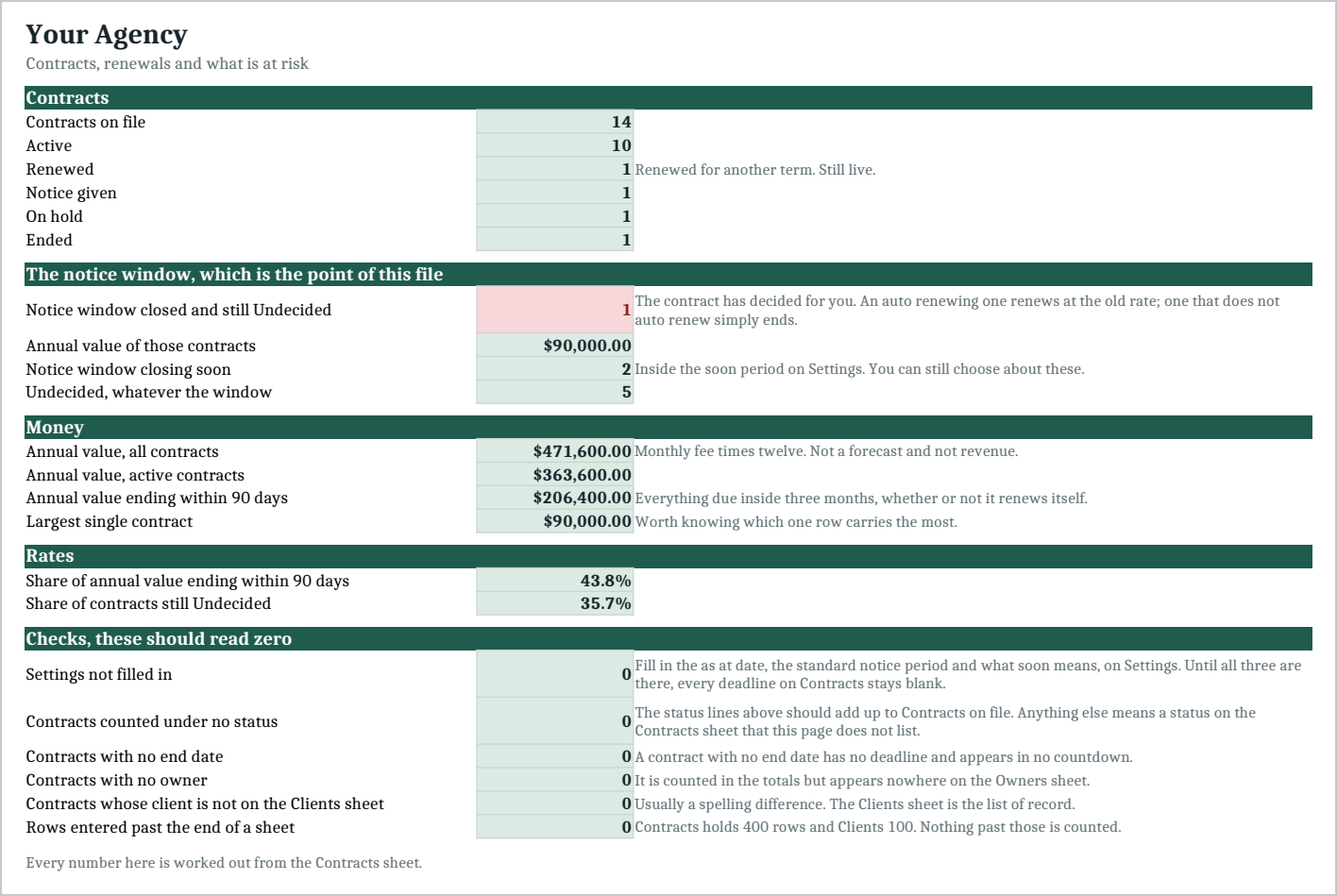
So this file works out a notice deadline on every row, from that contract's own notice period, and the number at the top of the Summary is contracts whose notice window has already closed with no decision recorded.
That is the one an end date list cannot show you, because on an end date list those contracts look fine. The sample has one sitting in it, whose deadline passed six weeks ago while the end date is still months away.
What you get
One Excel workbook with seven sheets:
- Start Here - How to use it in eight steps, inside the workbook.
- Settings - Agency name, the as at date every countdown is measured from, your standard notice period, and how many days ahead counts as soon.
- Clients - Each client and the person who owns the relationship.
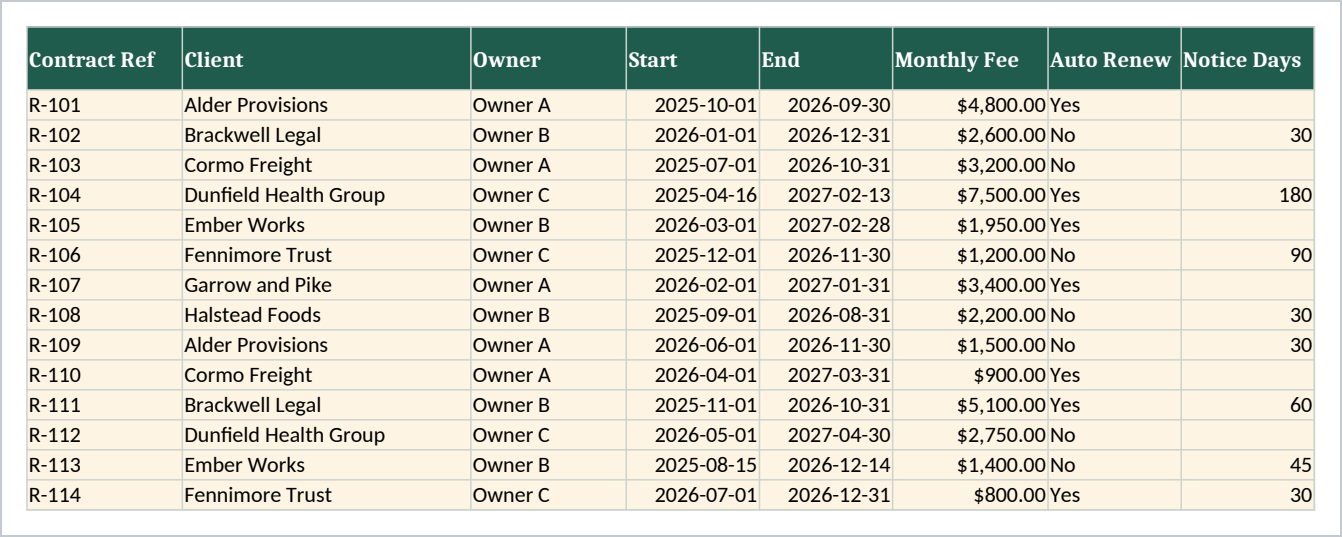
- Contracts - One row per contract: reference, client, owner, start, end, monthly fee, auto renew, notice days, status and renewal decision. Days to end, notice deadline, days to notice, notice window, annual value and when it ends all work themselves out.
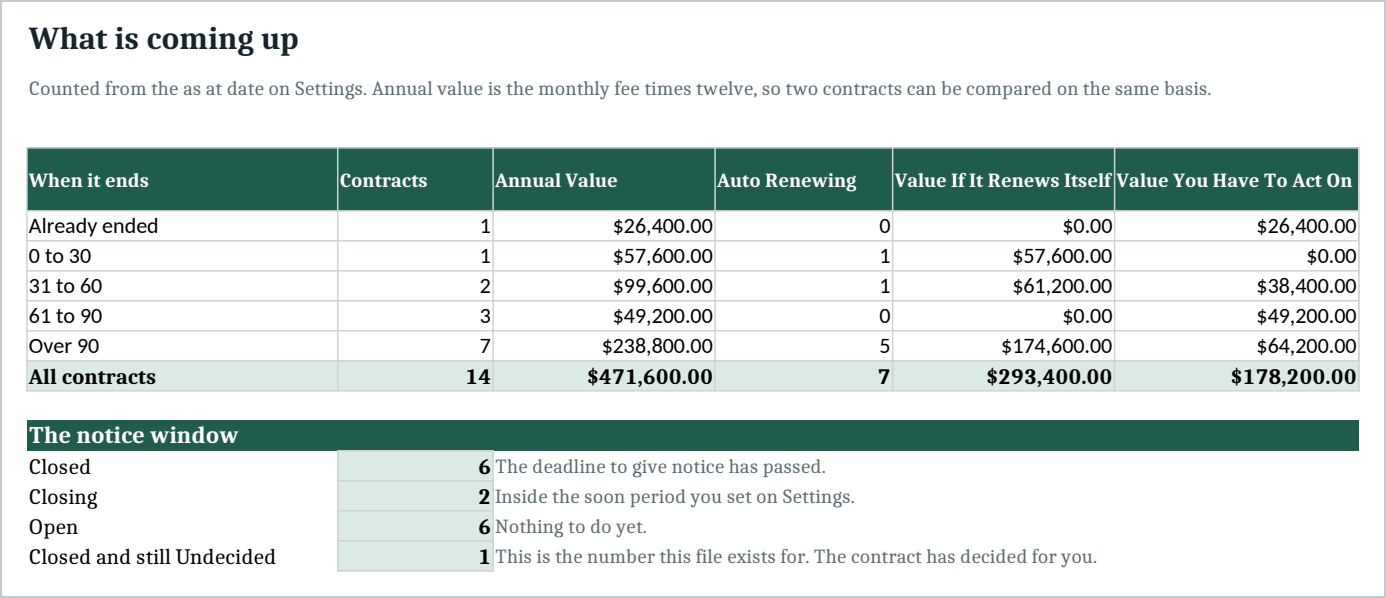
- Renewals - What is due across already ended, 0 to 30, 31 to 60, 61 to 90 and over 90 days, with the value split by whether the contract renews itself or you have to act.
- Owners - Contracts, active contracts, annual value, closed notice windows and undecided renewals, per owner.
- Summary - The agency level picture, the notice window block, the money block, two rates and six checks that should read zero.
Leave Notice Days blank and the contract uses your standard notice period from Settings, so a contract added in a hurry never silently gets a notice period of zero.
Every total is a formula. The file arrives with fourteen sample contracts across eight clients and three owners, including one lapsed renewal, one already ended and one on hold, so you can see it working before you put your own numbers in.
Why auto renew is a column and not a footnote
The two failure modes are opposite. An auto renewing contract you meant to raise the price on renews at last year's rate. One that does not auto renew and was going to be renewed just stops, and the client notices before you do.
The Renewals sheet splits the value at risk by which kind it is, rather than giving you one number that mixes them.
Who it is for
The owner or account lead of a small agency, studio or consultancy carrying somewhere between five and fifty retainer clients: marketing, design, development, PR, bookkeeping or IT support. It suits a business whose contract dates live in somebody's memory, a folder of PDFs, or a calendar reminder that was set once.
What it is not
It is not a contract management system and it holds no contract documents. It does not send reminders, it does not sign anything, it does not connect to your email or your accounting, and it does not know your payment terms.
It does not read a contract for you either. The notice period on each row is the one you type in, taken from the contract you have. Nothing here is legal advice.
Annual value is the monthly fee times twelve, so two contracts can be compared on the same basis. It is not a forecast and it is not revenue.
You need Excel, or Google Sheets, to open it. Import instructions are in the guide.
Refunds
Refunds within 30 days, for any reason. Reply to your receipt and the payment goes back in full. You keep the files; there is nothing to return.