Appointment No Show and Utilization Tracker, Excel
Seven connected sheets that log what happened to every booked slot and then show where the empty ones actually are: which provider, which session and which appointment type.
Refund policy
Refunds within 30 days, for any reason. Reply to your receipt and the payment goes back in full. You keep the files; there is nothing to return.
What it looks like
What it does
What you get
One Excel workbook with seven sheets:
- Start Here - How to use it in eight steps, inside the workbook.
- Settings - Practice name, and the first and last day of the period. Both are printed on the Summary heading, so the page you file says which weeks it covers.
- Providers - Your staff, with an ID each, and how many slots each one offers in the period.
- Appointments - One row per booked slot: date, your booking reference, provider, session, appointment type, what happened, and what the slot is worth.
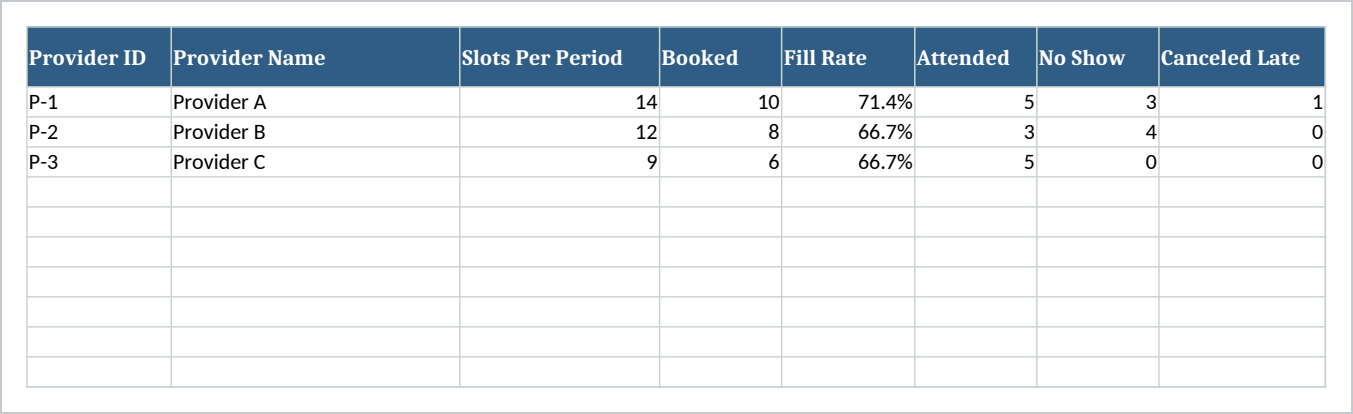
- Provider Summary - Slots offered and slots booked per provider, the fill rate between them, then attended, no show and late cancellation counts, attendance and no show rates, and slot value booked against value not delivered.
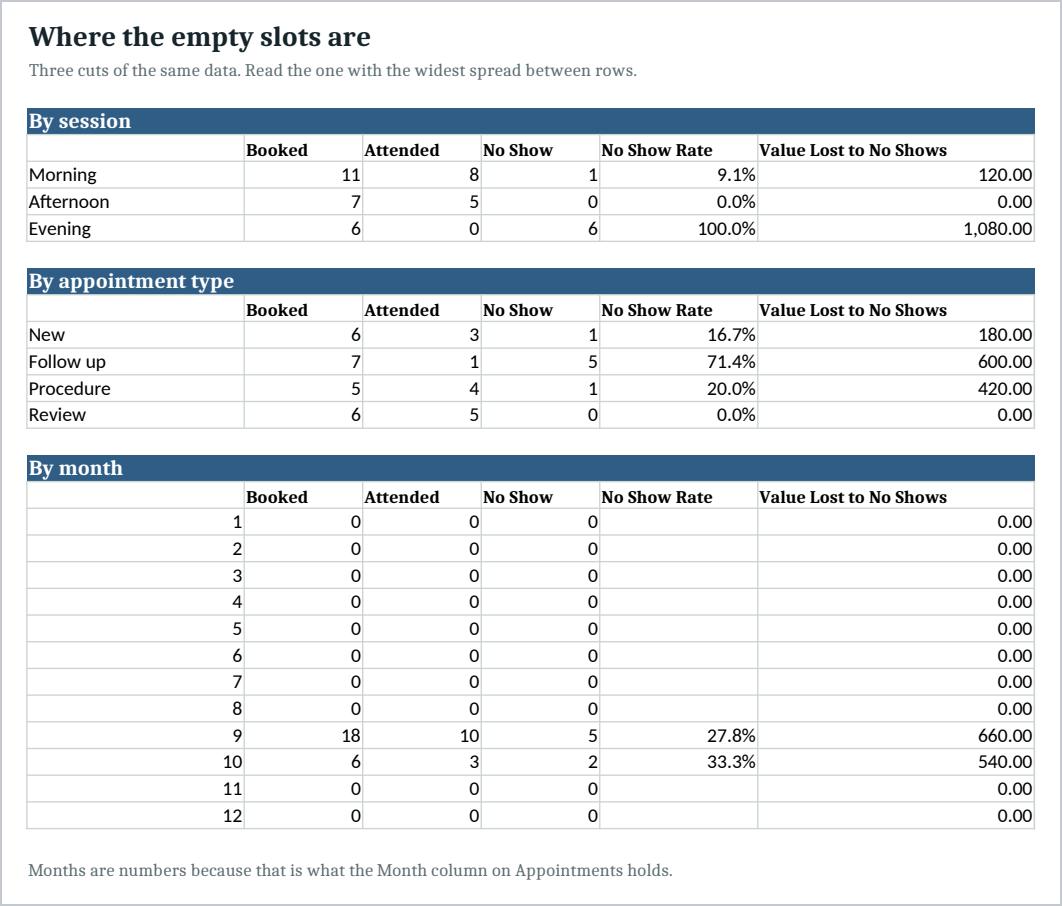
- Patterns - The same data cut three ways: by session, by appointment type and by month. The cut with the widest spread is the one worth acting on.
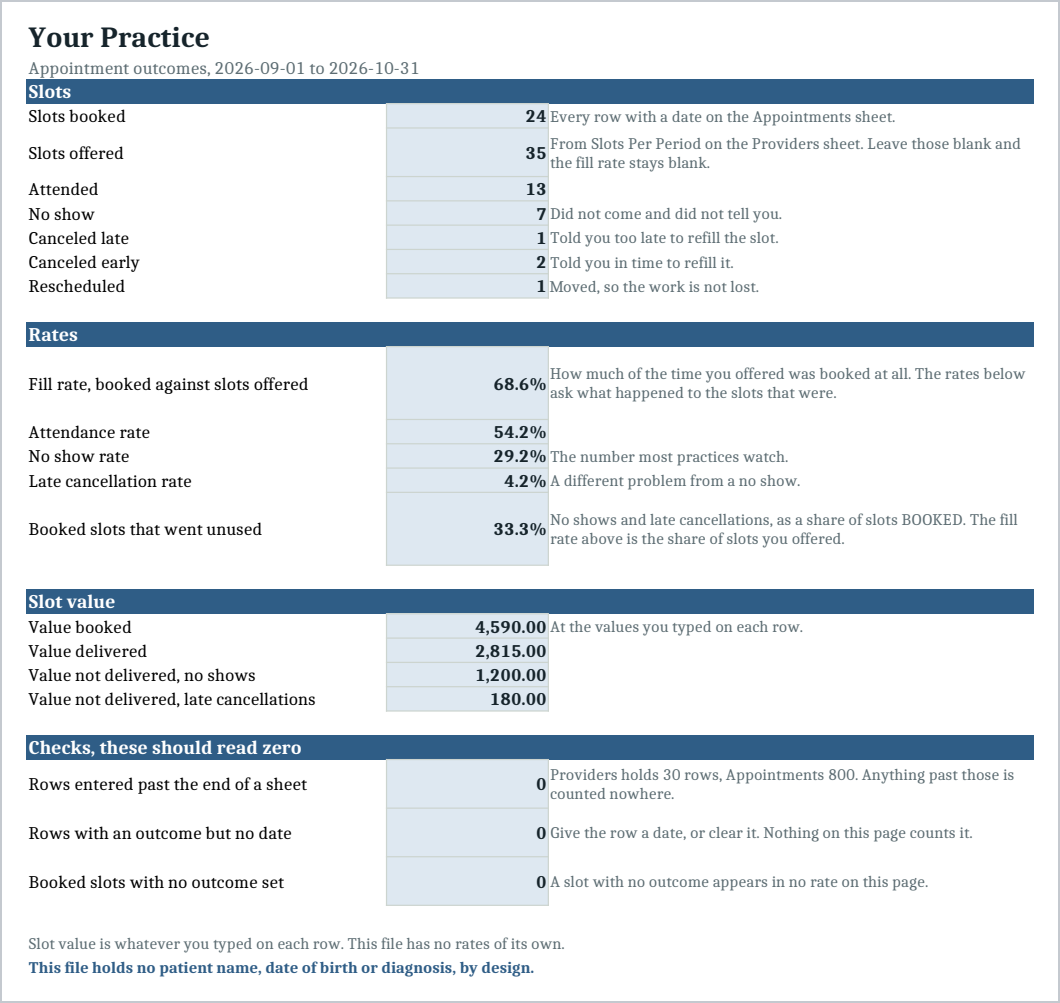
- Summary - The practice level picture: the fill rate, the four outcome rates and the slot value split. Booked slots that went unused is a share of slots BOOKED; the fill rate is the share of slots you OFFERED.
Two different questions, and most trackers answer only one. How much of the day did you sell, which is slots booked against slots offered, and what happened to the slots you did sell. A practice can have a spotless attendance record and still be half empty, and no rate built on booked slots can see that, because a slot nobody booked is not in the denominator. This file reports both.
Five outcomes, kept apart. Attended, no show, canceled late, canceled early, rescheduled. Those are five different problems, and a single cancellation rate hides which one you have. A practice full of early cancellations has a different job to do from one full of no shows.
Every total is a formula. The file arrives with a sample of two months, September and October, so you can see it working before you put your own numbers in.
It holds no patient information, by design
There is no column for a patient name, a date of birth, a diagnosis, a phone number or a reason for the visit. There is nowhere to type one. Its one identifier is a booking reference, which is your own number for a slot rather than for a person.
Everything this file measures works without knowing who anybody is. Keeping identifying information out of a spreadsheet that gets emailed, copied to a laptop and opened at home is the simplest protection there is, and this file is built so you never have to.
Who it is for
The practice manager of a clinic with one to about ten providers: dental, chiropractic, physical therapy, veterinary, counseling or a small medical practice. It suits a practice that has a booking system but no reporting worth reading, which is most of them.
What it is not
It is not practice management software and it is not a diary. It does not book anybody in, it does not send reminders, it does not connect to your booking system, and it holds no clinical record of any kind.
It makes no claim about any law or standard. What it does is described above: it counts outcomes against slots you type in, and it contains no patient information.
Slot value is whatever you type on each row. This file has no rates of its own and does not know what your work is worth.
You need Excel, or Google Sheets, to open it. Import instructions are in the guide.
Refunds
Refunds within 30 days, for any reason. Reply to your receipt and the payment goes back in full. You keep the files; there is nothing to return.